My Blogs

Blogs

/

Blog Details

Google Business Profile Alappuzha: 7 Mistakes Local Business Owners Must Avoid

Comments

1 Comments

Author

Sharath

Post Date

A young man helping a local business owner in Alappuzha register on Google Business Profile using a smartphone
View
0
Shares

“Appearing on Google Maps and Search is the fastest way to grow your local business in Alappuzha. Your Google Business Profile is your digital shop board don’t leave it blank!”

Google Business Profile (formerly Google My Business) helps customers in Alappuzha find your business on Maps and Search. In this blog, learn step-by-step how to set it up and avoid 7 common mistakes that can cost you leads.

What Is Google Business Profile?

Google Business Profile allows your business to appear in local Google Search results and Google Maps. It acts as an online business card that shows your address, phone number, photos, and customer reviews—all visible when people search for businesses like yours.

Many successful local shops using Google Business Profile Alappuzha have seen higher footfall and more reviews online.

Google Business Profile Alappuzha

Here's how to create and verify your Google Business Profile Alappuzha listing in simple steps.

1. Visit Google Business Profile

Open your browser (e.g., Chrome).
Enter: www.google.com/business
Click “Manage now” and sign in with your Google account.

2. Enter Business Name

Type your business name as you want it shown.
Claim your business if it appears, or click “Add your business to Google.”

3. Select Business Category

Choose the category that fits your business best (e.g., Restaurant, Baker, Electrician).

4. Add Location or Service Area

If customers visit you: Enter your full address (double-check for accuracy).
If you visit customers: Choose “I deliver goods and services to my customers” and set your service area.


5. Add Contact Details

Enter phone number and website (if you have one).


6. Verify Business

Most common: Google mails a postcard to your address. Enter the code online when you receive it.

Some cases: Verify by phone, email, or video.


7. Optimize Your Profile

Upload clear photos of your business, products, or services.
Set accurate business hours, including holidays.
Encourage happy customers to leave a Google review.

SEO & Answer Engine Optimization Tips

Use a clear, keyword-rich title and subheadings (as in this guide).
Add alt text like “best restaurant in Alappuzha” or “Google Business Profile Alappuzha setup” to your images for better local SEO.

Include local phrases in your description (e.g., “best tailor in Alappuzha”).
Keep your content concise and use lists for readability.
Update your business details often to stay accurate.

Frequently Asked Questions (FAQ)

Yes, Google Business Profile is free for all businesses.

Usually 1–2 weeks for the postcard. Sometimes you can verify instantly via phone or email.

Yes, if you have more than one shop, you can add each location.

To find a business’s Google Business Profile, simply search for the business name on Google or Google Maps. If the business is registered, you’ll see its profile with details like address, hours, reviews, and photos in the right sidebar (on desktop) or top results (on mobile).

Creating a Google Business Profile is completely free. However, if you're a freelancer or agency helping a client set it up, you can charge based on your service, usually ranging from ₹500 to ₹5,000 depending on:

  • Whether you’re also optimizing it for SEO

  • Adding photos, services, and products

  • Verifying ownership

  • Updating content and reviews regularly

You can’t directly see the owner, but if you're logged in to a Google account with access, the profile will say “You manage this Business Profile”. If you’re unsure, go to the profile on Google Search or Maps, click “Own this business?” or “Claim this business”, and Google will guide you if it’s already claimed.

Google Business Profile (formerly Google My Business) is a free tool by Google that helps businesses appear on Google Search and Maps. It displays important info like your:

  • Business name

  • Address

  • Phone number

  • Photos

  • Reviews
    This helps local customers find and contact you easily.

Conclusion

Starting your Google Business Profile Alappuzha journey now helps your shop become easily discoverable by local customers. Registering your business on Google Business Profile helps local customers find you quickly and builds your reputation online. By following these simple steps and structuring your WordPress post with clear headings, bullet points, and FAQs, you’ll make your post easy to read, SEO-friendly, and accessible for everyone.

Take your first step today help customers in Alappuzha connect with your business!

Related Blogs

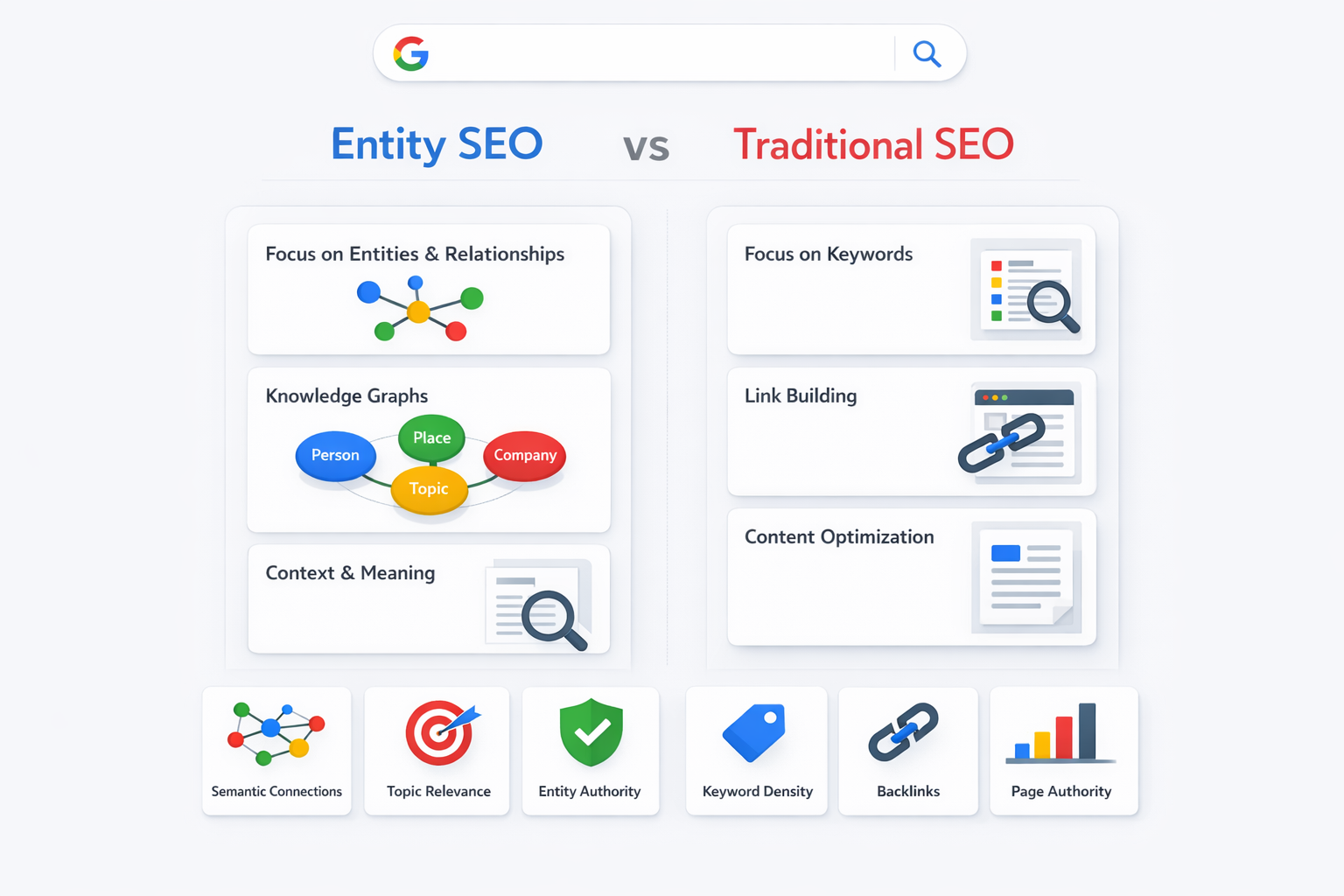
What is entity SEO and how does it differ from traditional SEO?

Understanding entity SEO has become critical for anyone serious about organic growth. While traditional SEO practitioners chase individual keywords, forward-thinking marketers are building topical authority through entities, semantic relationships, and knowledge-graph thinking—the same way Google actually understands the web.

Leave a Reply

Your email address will not be published. Required fields are marked *